Python运行MSSQL存储过程采坑记
虽然入门Python已经多年,但由于日常工作中,特别是生产环境上没有Python项目,对Python一直不算非常熟练,基本上只是偶尔用它在本地写一些工具性脚本。最近又用它造轮子,核心功能就是按配置去自动执行一些SQL和SP。遇到了一些问题,特此记录之。
问题描述
pyodbc执行单条SQL时非常顺利,但在执行某些SP时出现了奇怪的现象:
- SP才执行一半就自动退出
- SP报错了,Python却没捕获到
同样的SET选项和SQL语句,若换成pymssql库去执行,SP不会有执行一半退出的情况,但仍然捕获不到异常
原因
在使用pyodbc时,一切输出都被视为结果集,无论是来自SELECT的结果集,还是通过print或raiserror打印出的信息,甚至包括SET NOCOUNT OFF的情况下执行DML语句后出现的"xxx rows affected"信息。默认情况下,游标(cursor)会指向第一个结果集。如果SQL返回多个结果集,需要执行cur.nextset()切换到下一个结果集,否则在第一个结果集之后出现的错误信息将无法被客户端捕获。
为了获取所有的结果集,需要使用nextset方法。如果不这样做,可能会出现批处理执行了部分SQL后就提前结束的情况。微软有相关的文档介绍了这个特性,具体执行多少条SQL后会结束,取决于内部缓冲区大小。据我观察,若存储过程中使用了raiserror打印消息的情况,这种情况会更加频繁。
pymssql(测试版本2.2.7)可能是使用的协议不同(似乎只能使用TCP协议而不支持Named pipes和Shared memory)它会ignore message性质的结果,而且出现运行一部分sql就停下来等client获取result set的情况会少一些,可能是因为TCP协议的buffer size比较大?
但pyodbc和pymssql都有无法捕获在正常selelct结果集之后出现的error的情况,必需将出现error的那句sql之前的所有结果集都fetch完或调用nextset才会报错。
问题再现
Can’t capture exception
import pyodbc
conn = pyodbc.connect('your_connection_string',autocommit=True)
with conn.cursor() as cur:
    cur.execute('set nocount on')
    cur.execute("""
        insert into dbo.test_table values ('A'),('B'),('C');
        select count(*) as cnt from dbo.test_table;
        select 1/0;
    """)
    print(cur.fetchall())
以上代码可正常输出表test_table的行数,却不报错(最后有个除以0的语句,理应报错)
Code exit before SP complete
- 测试SP
USE TSQLV3
GO

DROP TABLE IF EXISTS [dbo].[test_table]
GO

CREATE TABLE [dbo].[test_table]
(
[id] [int] NOT NULL IDENTITY(1, 1) PRIMARY KEY,
[title] [nvarchar] (200)
)
GO

INSERT INTO TSQLV3.dbo.test_table(title)
    SELECT name
    FROM master.sys.columns
GO

CREATE OR ALTER PROC dbo.sp_test AS
BEGIN
    SET NOCOUNT ON;
    SET XACT_ABORT ON;
    BEGIN TRY
        SELECT 400;

        UPDATE TSQLV3.dbo.test_table SET title = title + '0' WHERE id % 7 = 0;
        UPDATE TSQLV3.dbo.test_table SET title = title + '1' WHERE id % 7 = 1;
        UPDATE TSQLV3.dbo.test_table SET title = title + '2' WHERE id % 7 = 2;
        UPDATE TSQLV3.dbo.test_table SET title = title + '3' WHERE id % 7 = 3;
        UPDATE TSQLV3.dbo.test_table SET title = title + '4' WHERE id % 7 = 4;
        UPDATE TSQLV3.dbo.test_table SET title = title + '5' WHERE id % 7 = 5;
        UPDATE TSQLV3.dbo.test_table SET title = title + '6' WHERE id % 7 = 6;

        SELECT 800;

        DECLARE @i INT = 0,@msg VARCHAR(400);
        WHILE @i < 10
        BEGIN
            SET @msg = 'msg -- ' + LTRIM(@i);
            RAISERROR(@msg,0,1)  WITH NOWAIT;
            SET @i += 1;
        END

        UPDATE TSQLV3.dbo.test_table SET title = title + '8' WHERE id = 100;
        SELECT TOP 20 * FROM TSQLV3.dbo.test_table;
        UPDATE TSQLV3.dbo.test_table SET title = title + '88' WHERE id = 200;

    END TRY
    BEGIN CATCH
        SELECT ERROR_MESSAGE();
        THROW;
    END CATCH
END
GO
- Python执行SP
import pyodbc
conn = pyodbc.connect('your_connection_string',autocommit=True)
with conn.cursor() as cur:
    cur.execute('set nocount on')
    cur.execute("""
        exec TSQLV3.dbo.sp_test
    """)
    print(cur.fetchall())
    print(cur.fetchall())
输出:
[(400, )]
[]
上面SP中有多个结果集输出和打印性质的message返回,但python代码的fetchall方法只获取了第一个结果集,再次调用此方法输出只有空集合。
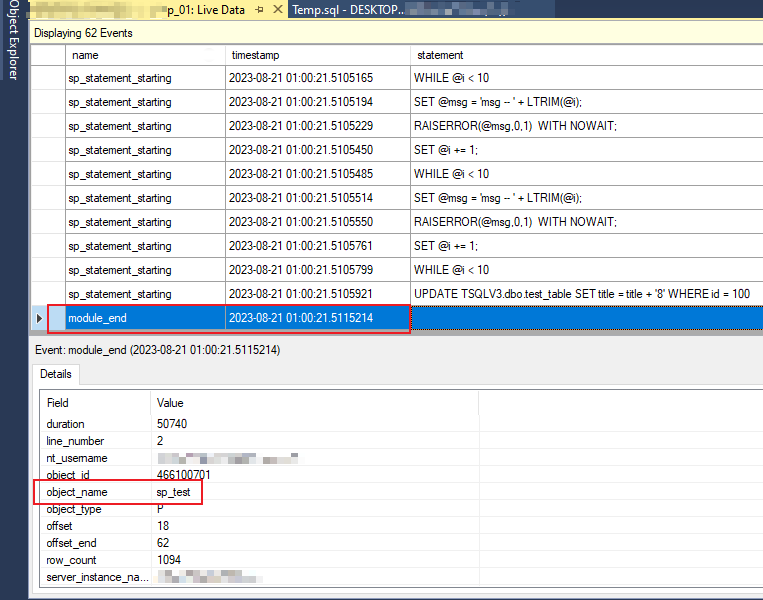
用xEvent或profiler的TSQL_SPs模板跟踪SQL执行情况,发现最后两句SQL没执行SP就退出了
解决方案
1 - 考虑多结果集
若调用的SP会返回多个结果集或message,可采用类似下面的代码
- 示例代码 1 - 获取scalar结果和返回message直至没有更多输出
import pyodbc
import sys
conn = pyodbc.connect('your_connection_string',autocommit=True)
with conn.cursor() as cur:
    cur.execute('set nocount on')
    cur.execute("exec TSQLV3.dbo.sp_test")
    while True:
        try:
            print(cur.fetchval())
        except:
            print(cur.messages) # messages 需要 4.0.31+ 版本才支持
        finally:
            if not cur.nextset():
                break
- 示例代码 2 - 获取最后一个select结果集
def get_last_result(cusor):
    result = None
    error_msg = ''
    while True:
        try:
            result = cusor.fetchall()
        except pyodbc.ProgrammingError as e:
            if str(e) == 'No results.  Previous SQL was not a query.':
                pass
            else:
                error_msg = str(e)
        finally:
            if not cusor.nextset():
                break
    if error_msg:
        raise Exception(error_msg)
    return result
2 - 放弃DBAPI,通过调用 SQLCMD 去执行SP
若不用获取SP返回的结果,仅需知道SP是否执行成功,则可直接通过SQL Server官方命令行工具SQLCMD去执行SP,示例代码如下:
import subprocess
def execute_sql_query(query):
    command = fr'sqlcmd -S localhost -T -Q "{query}"'
    try:
        result = subprocess.run(command, shell=True, check=True, text=True, capture_output=True)
        return result.stdout
    except subprocess.CalledProcessError as e:
        raise Exception(f"SQL query execution failed: {e.stderr}") from e
其它相关Blog: Python数据库编程(以pyodbc和SQLAlchemy为例)